/ tools / proxie

Point it at a day's camera cards and walk away. Proxie finds every clip in every folder, works out which log profile each camera shot in, and writes editing proxies that are already colour-corrected to Rec.709, in a Proxies folder laid out exactly like your footage.
What it looks like
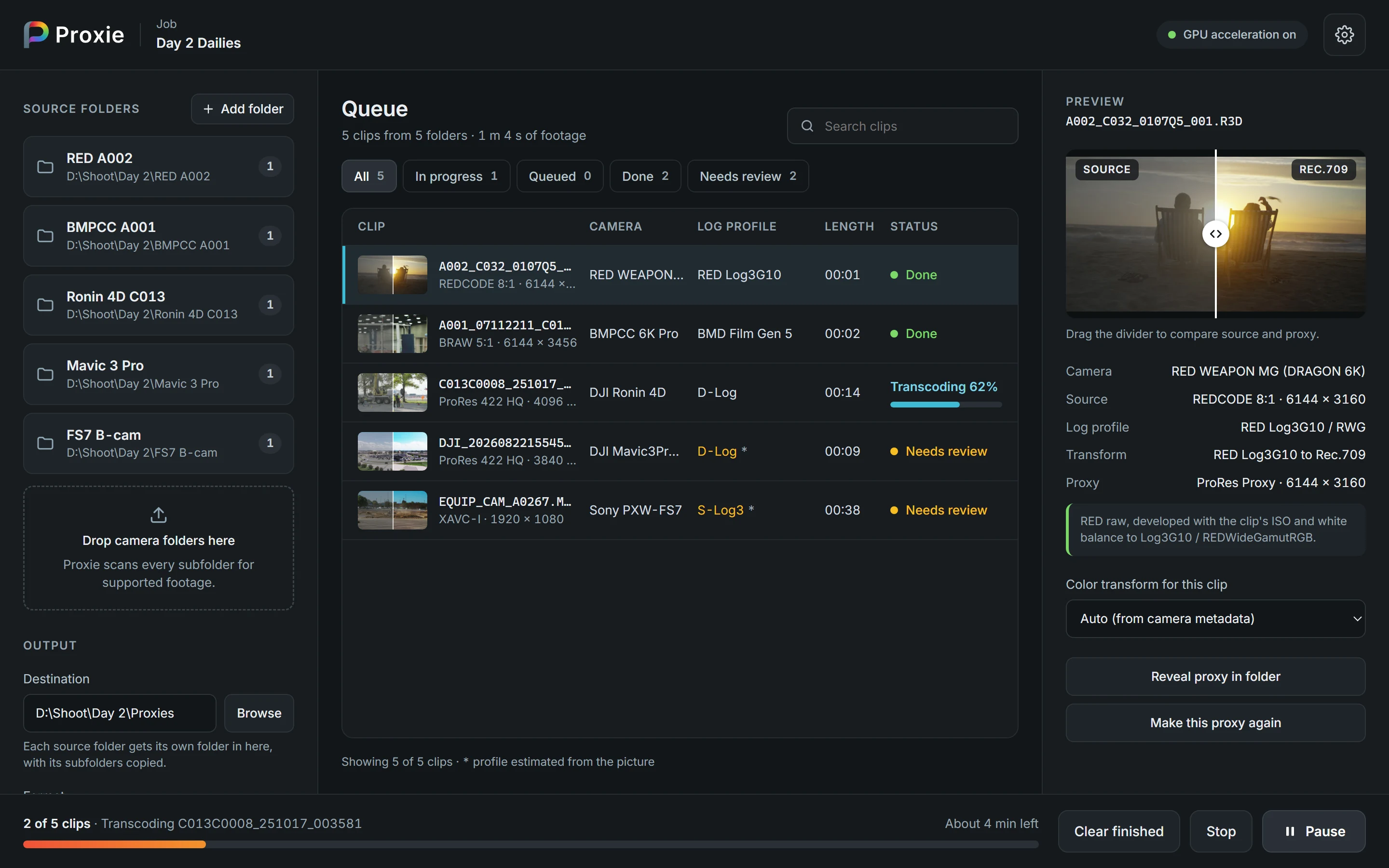
Source folders on the left, the queue in the middle, and a before-and-after of whichever clip you click on the right.
Whole cards at once
Drop camera folders on the window or click Add folder. Every subfolder is
searched, so a card's PRIVATE\M4ROOT\CLIP or a RED .RDC folder needs no digging.
Proxies your editor relinks
Same file names, same timecode, same frame rate and every audio track the camera recorded, so Premiere and Resolve attach them to the originals without fuss.
Pause means pause
Pause freezes the work exactly where it is and Resume carries on. Stop throws away only the clips in progress. Run the same folders again later and it makes only what's missing.
Fast where it counts
RED raw is debayered on the graphics card, Blackmagic RAW and RED are decoded straight at the size you need, and two clips run at a time (up to six in Settings).
Burn-in when you want it
One tick adds the clip name bottom left and running timecode bottom right, for review copies.
Nothing leaves your PC
No account and no upload. It reads your footage and writes proxies, and never changes a camera file.
The colour, done for you
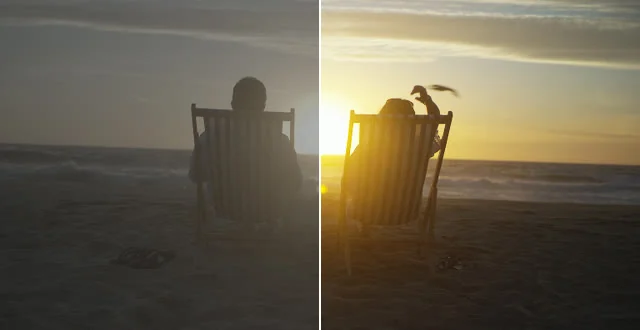
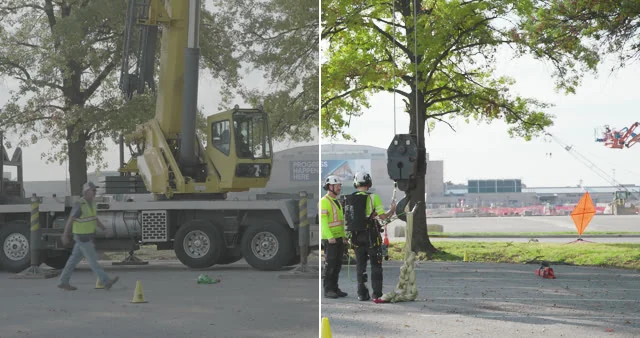
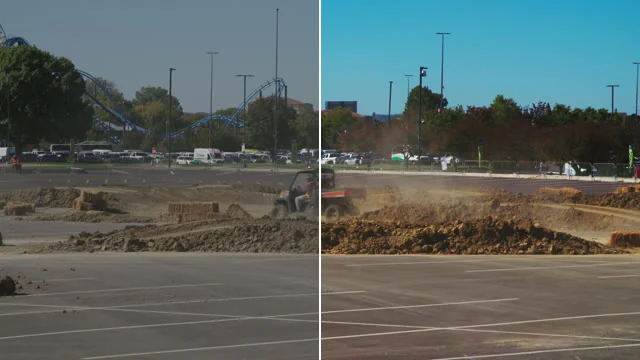
Log footage looks grey and flat until it's graded, which makes it miserable to cut with. Proxie reads which log each camera used and converts it with the maker's published maths, so your proxies look like a finished picture from the first frame.
 LOG3G10REC.709
 D-LOGREC.709
 S-LOG3REC.709
 FILM GEN 5REC.709
First, the camera's own word
Blackmagic RAW and RED say what they are. Sony writes its gamma into an XML block, DJI into its own metadata track, and Canon, Panasonic, ARRI, Fujifilm, Nikon and Apple leave the profile's name in the file.
Then, the picture
When a file says nothing, Proxie measures a few frames. Lifted blacks, low highlights and little colour means log, and the camera's usual profile is used. The clip is marked Needs review so you can check it. Footage that already looks like Rec.709 is left alone.
Your call, any time
Pick a different transform for any clip from the preview panel and the preview updates on the spot. A brightness nudge in Settings shifts every clip up or down if you like your proxies brighter.
Profiles it knows
- ARRI LogC4
- ARRI LogC3
- Sony S-Log3 / S-Gamut3.Cine
- Sony S-Log3 / S-Gamut3
- Sony S-Log2
- Canon Log 3
- Canon Log 2
- Panasonic V-Log
- Blackmagic Film Gen 5
- RED Log3G10
- DJI D-Log
- DJI D-Log M*
- Fujifilm F-Log2
- Fujifilm F-Log
- Nikon N-Log
- Apple Log
- HLG
- Rec.709 (leave as is)
* DJI has never published the D-Log M curve, only a LUT, so that one is a close approximation. Every other transform uses the manufacturer's own formulas.
Cameras and formats
| RED (.R3D) | RED's own decoder is built in. The heavy lifting runs on an NVIDIA or AMD graphics card,
about six times faster than the processor alone (it still works without one). A take that spans
_001.R3D, _002.R3D… becomes a single proxy. The clip's ISO and white balance are used,
including changes saved in an RMD sidecar. |
|---|---|
| Blackmagic RAW (.braw) | Blackmagic's own decoder is built in. |
| ProRes, H.264, H.265, XAVC | MOV, MP4, MXF and MTS files from Sony, Canon, Panasonic, DJI, ARRI, Fujifilm, Nikon, iPhone, GoPro and the rest, through ffmpeg (built in). |
| Not supported | ARRIRAW, Canon Cinema RAW Light and Nikon N-RAW. They show up as Can't read and are skipped. |
Where the proxies go
A Proxies folder next to the first folder you add, with each source folder and all its subfolders copied inside it. Or anywhere you like: click Browse.
D:\Shoot\Day 2\
├── RED A002\A002_C032_0107Q5.RDC\A002_C032_0107Q5_001.R3D
├── FS7 B-cam\XDROOT\Clip\EQUIP_CAM_A0267.MXF
└── Proxies\
    ├── RED A002\A002_C032_0107Q5.RDC\A002_C032_0107Q5_001.mov
    └── FS7 B-cam\XDROOT\Clip\EQUIP_CAM_A0267.mov
Add a camera card straight from its drive letter and the proxies go in your Videos folder instead, so nothing is ever written onto a card.
| Format | ProRes 422 Proxy (.mov) by default. Also ProRes 422 LT, DNxHR LB (.mxf) and H.264 (.mp4, encoded on the graphics card when there is one). |
|---|---|
| Size | Full (the camera's own size) by default, 4K (fits inside 4096 × 2160) or 1080p (fits inside 2048 × 1080). Never upscaled, never stretched. |
| Names | The camera's file names, so your editor can match them. Untick Match source file names to add
_proxy instead. |
| Folders | Untick Mirror source folder structure to put every proxy straight into the destination. |
Installing Proxie
Windows will warn you on first run
The installer isn't code-signed. A certificate costs a few hundred dollars a year, which is hard to justify for
something shared with friends. Click More info, then Run anyway. You'll only see it once.
It installs under your own account, so there's no admin password, and it uninstalls from Settings → Apps.
Keep your camera originals
Proxie only ever reads your footage. Still, check the proxies before you wipe a card.
Settings and the log are kept in
%LOCALAPPDATA%\LutzStack\Proxie (gear icon → Open log folder). If something fails, select the
clip: the reason is under its buttons. Includes the RED R3D SDK and Blackmagic RAW SDK libraries, used under their
makers' licences. RED and Blackmagic RAW are their owners' trademarks.